Change orders without the busywork

Logging becomes execution.

Keep the construction process your team already knows. Remove the spreadsheet hunting, document rebuilding, email chasing, and manual filing around it.

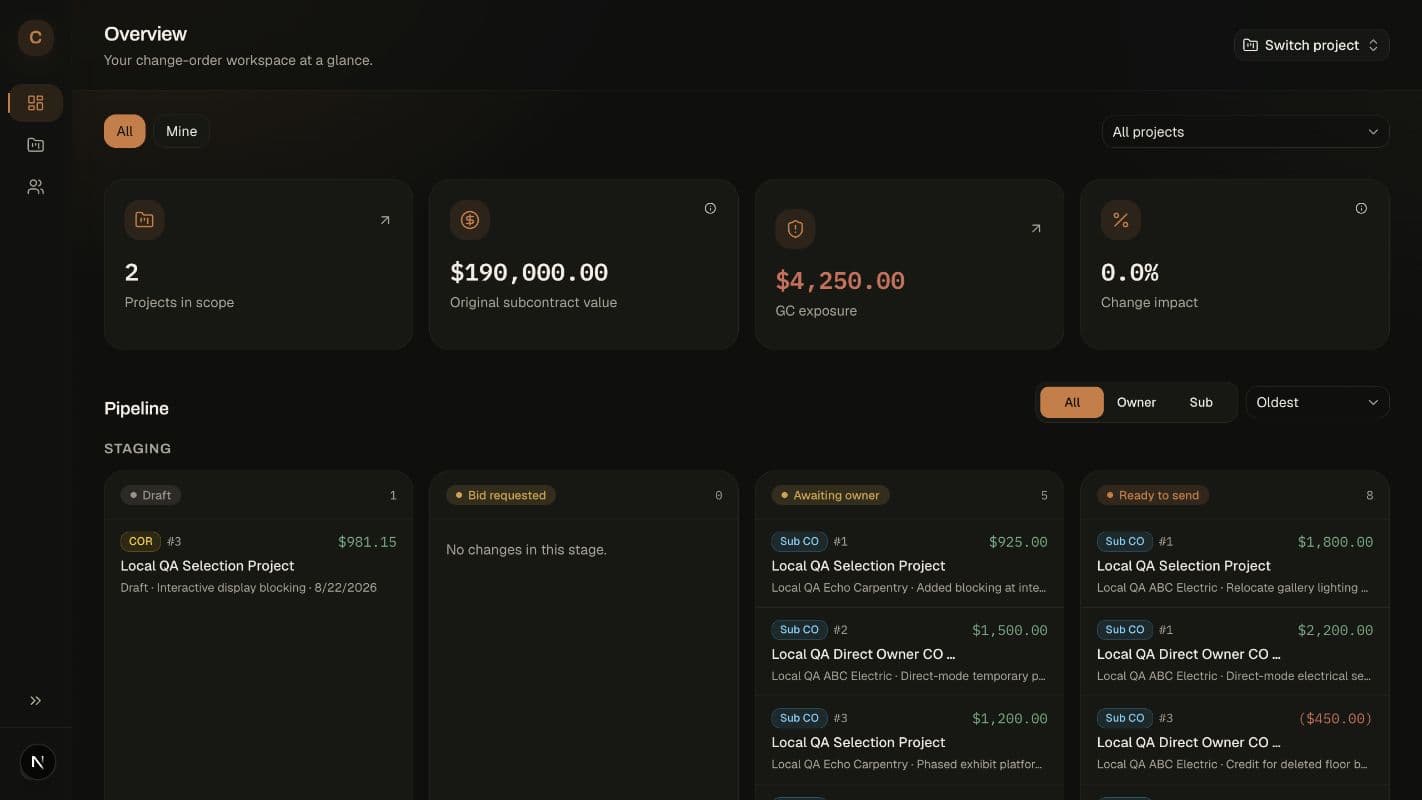
ConstructGen dashboard showing project totals and a combined Sub and Owner change-order pipeline
1
2
1One pipelineSub COs, CORs, Owner COs, and AIA COs stay visible from draft through execution.
2Know the exposureSee uncovered subcontract cost before it gets lost in the project.

Before ConstructGen

The log is only the beginning of the work.

  1. 01Find the spreadsheet log.
  2. 02Look up the last Sub CO.
  3. 03Rebuild the document with contract and subcontractor details.
  4. 04Save the PDF and open it in Adobe.
  5. 05Add the signature fields.
  6. 06Find the signer and every CC recipient.
  7. 07Send the email.
  8. 08Track the signatures somewhere else.
  9. 09Download and file the executed copy.
After ConstructGen

The log starts the execution.

Four simple steps replace the spreadsheet, PDF, Adobe, email, tracking, and filing handoffs.

  • Click Change Order.
  • Enter the amount and scope.
  • Review and send for signature.
  • ConstructGen tracks the signing sequence, keeps everyone copied, and files the executed version.

Easy to start at any project stage

Start new or catch up an active project.

Build the project record from the point where the job actually is. Begin with a clean slate or bring existing change-order logs current without sending another signature request.

Starting a new project

Create the job, add the contract values, and assign the subs you already work with. You can start issuing change orders immediately.

  • Create the project and enter its original contract values
  • Assign subcontractors and their existing contracts
  • Choose the signing and document defaults for the job

Joining a project already underway

Enter what has already happened, then continue from the current point with accurate totals, coverage, and files.

  • Log existing issued or executed Sub COs
  • Catch up executed CORs and Owner COs
  • File official AIA records and their signed documents

Built around the way construction already works

Less adoption. Less chasing. Better records.

No company-wide rollout

A project manager can use ConstructGen without requiring subcontractors or the rest of the company to create accounts.

Documents that look like yours

Drag and drop auto-filled blocks, custom text, checkboxes, signatures, your logo, and your company color.

Signing without the follow-up maze

Set signing sequences and copy recipients by company or project. Automated emails keep the right people moving and deliver executed copies.

One clear change-order dashboard

See Sub and Owner changes together, sort by stage, and know what is waiting, signed, executed, covered, or still exposed.

Build the form once. Let the project fill it in.

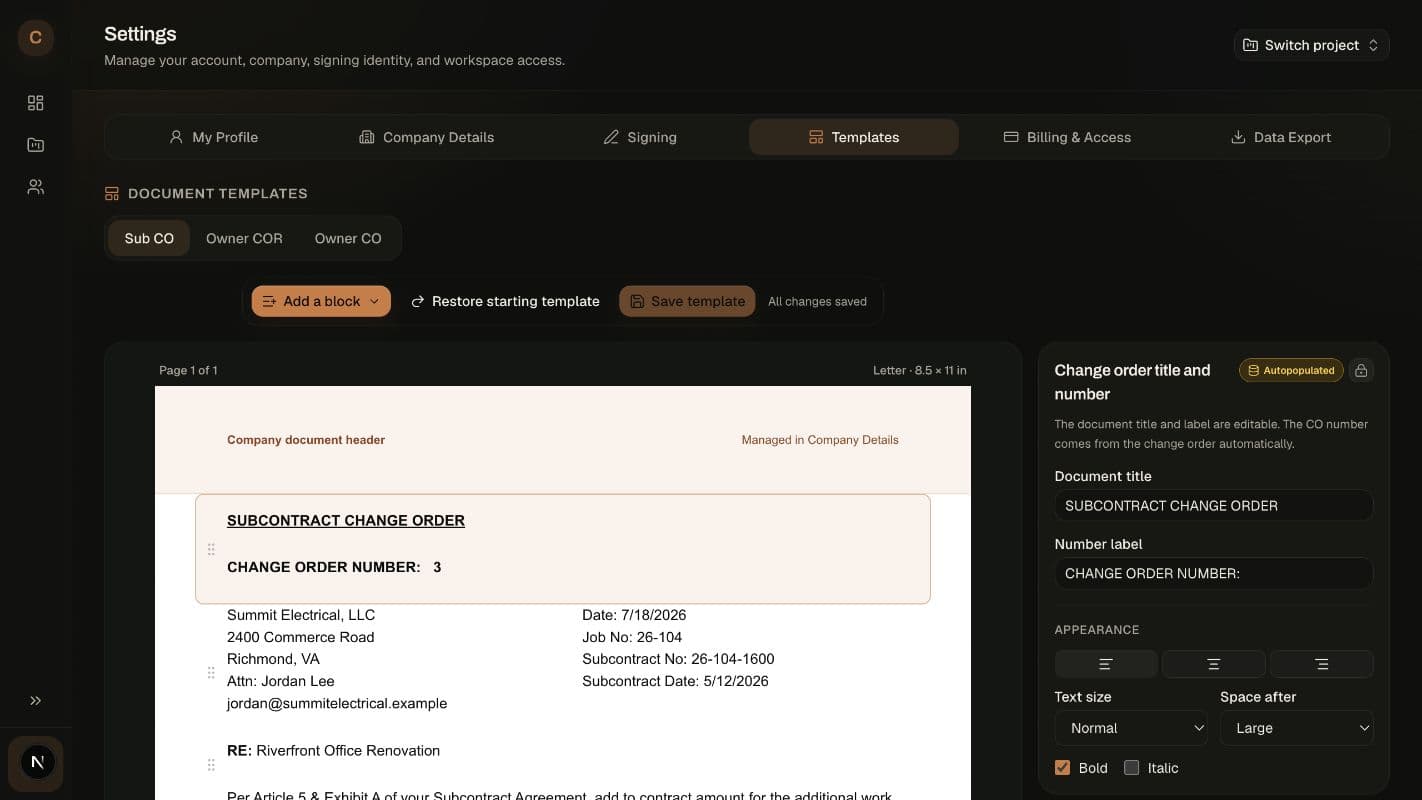
The template creator uses drag-and-drop blocks for project, subcontract, scope, cost, signature, custom text, checkboxes, and more. Choose company defaults, then adjust signing sequences or templates by project when the job calls for it.

ConstructGen drag-and-drop change-order template editor
1
2
1Auto-filled blocksProject, contract, subcontractor, cost, and signature details populate from the record.
2Make it yoursUse your logo, color, language, and layout without rebuilding each PDF.
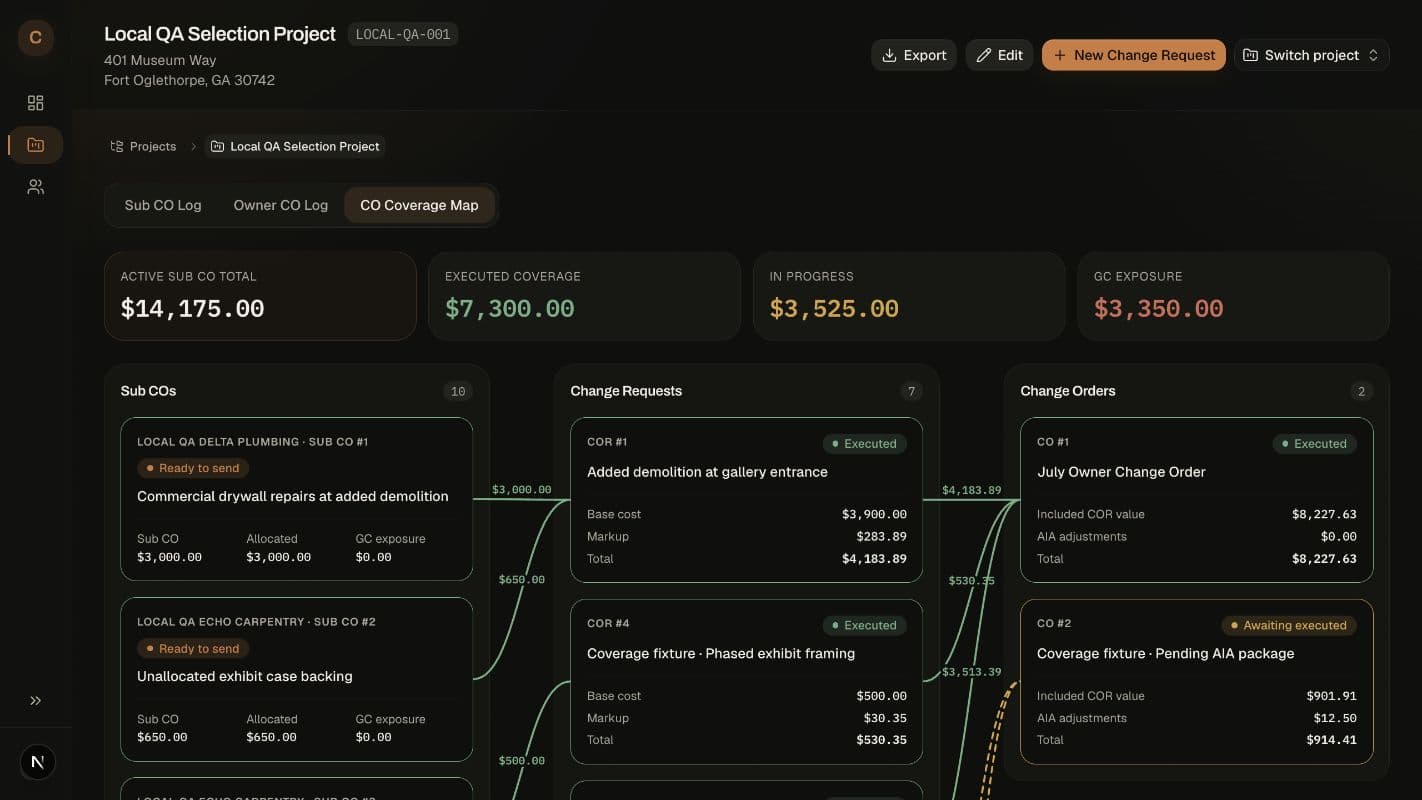
ConstructGen Owner Coverage view linking Sub CO costs to CORs and Owner COs
1
2
1Trace every costSee which Sub CO feeds each COR or Owner CO, including split and partial allocations.
2See what is still exposedCovered, in-progress, and unallocated dollars stay visually distinct.

Owner cost recovery

See where every Owner dollar comes from.

Link one or more Sub COs to an Owner change, add default or one-time markups, and know exactly how much cost is covered or still carried by the contractor.

  • Two-stage: Sub CO → in-app Owner CO
  • Three-stage: Sub CO → COR → official AIA CO
  • Optional automatic Sub CO release after Owner execution
  • Project-level Owner signing sequences and markups

Issue faster

The amount and scope become the log, PDF, signature request, and final file.

Protect the margin

Track Owner coverage and GC exposure before unrecovered costs disappear into the job.

Keep a clean record

Issued and executed copies, recipients, and signature history stay with the change.

Founding company offer

Put a real project through the complete workflow.

Five seats, unlimited projects and subcontractor contacts, company branding, signatures, reminders, and Owner change tracking.

  • 5 company seats
  • Unlimited projects
  • Unlimited subcontractors
  • Custom PDF templates
  • Signature workflows
  • Owner recovery tracking
$10$1
total for your first 3 months · then $10/month

Founding offer: $1 total for your first three months, then $10/month. Includes five seats. Card required. Cancel through Stripe anytime. The offer applies to the company workspace, not per seat.

Start for $1